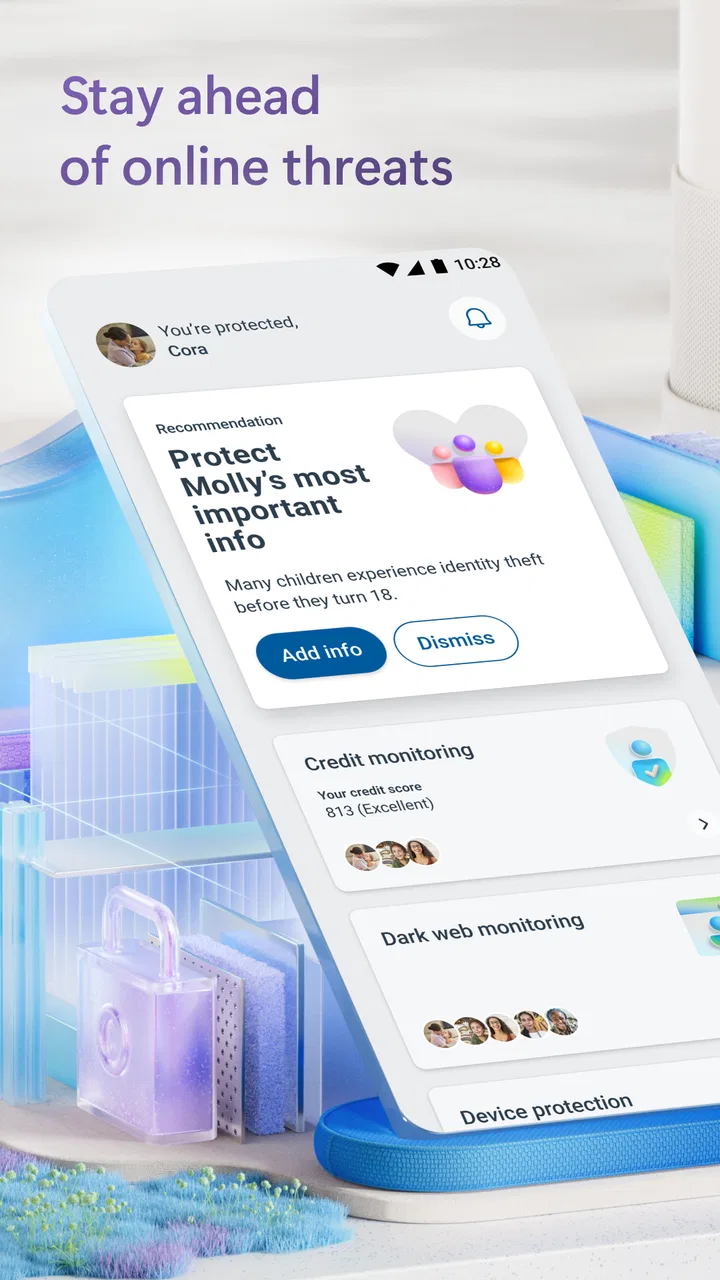
Microsoft Defender: Antivirus
- 4.4
- Rating
- 10.00M
- Installs
- Free
- Price

 Analysis by App-foxy
I approached Microsoft Defender: Antivirus as a practical security tool rather than something I would open every day for entertainment. It is an Android tools app from Microsoft Corporation, aimed at keeping protection active in the background and reacting to threats before they become a bigger problem. That sounds simple, but the useful question is whether it fits the way you use your phone, especially when setup screens, device compatibility, or another security product gets in the way.
My overall experience is that Defender makes the most sense for people who want a familiar name and a relatively hands-off layer of protection. It is free to install, available to users rated Everyone, and has reached more than ten million installs. Its average score sits at 4.4 from roughly eighty-one thousand ratings, which suggests broad approval, although a store score cannot tell you whether it will cooperate perfectly with your particular phone.
Where the experience can get stuck
The first point of friction is compatibility. The app requires Android 11 or newer, so an older phone cannot use it simply because the application appears in a search result or because Microsoft Defender is available on another device you own. I would check the Android version before spending time troubleshooting installation, sign-in, or protection status. If the operating system is too old, changing settings inside the app will not solve the underlying issue.
You May Also Like

 AccuWeather: Weather Radar
AccuWeather Review: A Quick, Clear Forecast for Everyday Decisions
For everyday plans, the best forecast is the one you can understand quickly. AccuWeather makes rain timing, radar, and local conditions easy to act on, with a few trade-offs.

 Hill Climb Racing
Why Hill Climb Racing Still Turns Crashes Into One More Run
A tiny car, a bumpy hill and one more upgrade: Hill Climb Racing keeps resurfacing because its simple chaos makes every near-miss feel personal.

 AliExpress - Shopping App
AliExpress Makes Global Shopping Feel Personal, but Shoppers Bear the Risk
AliExpress turns a global marketplace into a pocket-sized discovery engine. Its reach is useful, its shopping loop compelling, and its trade-offs easy to miss.

 Lords Mobile: Kingdom Wars
Lords Mobile Is a Kingdom-Building Routine, Not a Quick Match
A case-by-case verdict on the building, battles, device demands, and social commitments that make Lords Mobile rewarding for some players and exhausting for others.

 PDF Scanner app - TapScanner
TapScanner Makes Paperwork Easier to Capture, Check, and Share
TapScanner makes scanning with a phone feel less like a rescue operation and more like a dependable step in getting work done. Its capture tools are useful, though not flawless.

 Block Blast!
 Shows How Much a Puzzle Game Can Leave Out
A quiet grid game shows why puzzle players increasingly value instant clarity, repeatable skill and low-pressure play—and where the genre still needs to catch up.
More From Our News Desk
View All News


Another common stumbling block is expecting the app to behave like a traditional antivirus dashboard. Defender is designed around online protection and threat detection, not around a long list of manual maintenance tools. I would not install it expecting a duplicate of a desktop security suite with every possible scan, cleanup, and optimization option. Its value is strongest when it can remain part of a wider safety routine rather than when you repeatedly open it looking for dramatic activity.
There is also a difference between installing an app and completing its useful setup. After installation, I would read each screen carefully and make sure the protection status is clear before assuming the phone is covered. If the app asks me to continue through an account or setup flow, I would finish that process instead of closing it halfway and treating the presence of the icon as proof that protection is active.
People can also get confused when another security app is already installed. Two products trying to provide similar protection may create overlapping notifications, competing settings, or uncertainty about which one is responsible for a warning. I would decide which security tool I actually want to manage before interpreting every alert as an app failure. Defender may be working normally while another product changes the way the phone displays security messages.
On some phones, battery management can make background tools appear unreliable. Manufacturers sometimes limit background activity to extend battery life, and those restrictions can affect when an app checks in or updates its status. I would look at the phone’s battery and background-activity settings if the app seems to stop responding after the screen has been off for a long time. I would make changes carefully, because disabling every battery safeguard can create a different problem.
What I would check before blaming the app
My first check would be the Android version, followed by available storage and a stable internet connection during setup. I would then restart the phone once, open Defender again, and look for a clear indication of its current protection state. This basic sequence is more useful than repeatedly uninstalling and reinstalling without checking the conditions around the failure.
I would also check whether the phone is managed by a workplace, school, or family configuration. Device management can control security settings, account access, and installation behavior. In that situation, an apparent Defender problem may actually be a rule applied by the device owner. The sensible step is to understand who controls the phone before changing security settings that may be intentionally restricted.
Notifications deserve a separate check. If alerts are hidden, delayed, or grouped by the phone, the app may seem quiet even though it is operating. I would review the Android notification settings for Defender and make sure the app is not being silenced. At the same time, I would avoid assuming that a lack of notifications means a lack of protection; a security tool should not need to display constant warnings to be useful.
Defender’s current version is 1.0.9212.0102. I would use the app’s store page to see whether an update is available if behavior changes suddenly, particularly after an Android update. I would not install unofficial copies or modified packages to fix a setup problem. Security software is one area where the source of the installation matters as much as the feature list.
A setup routine that avoids unnecessary confusion
I would begin on a reliable connection, keep the phone charged, and close unrelated setup tasks. Then I would install the app, complete the initial screens, and pause long enough to read what each status message actually says. If Microsoft Defender requests an account step, I would use the account I intend to keep associated with the service rather than switching between several accounts during setup.
Once setup appears complete, I would take a moment to inspect the main screen again after restarting the phone. That small test is useful because it tells me whether the app returns to a normal state after a reboot instead of only working immediately after installation. I would also note whether another security application is active, since that can make later troubleshooting much harder.
I would not judge the app by how many controls it exposes. For this kind of tool, a clean status and unobtrusive operation are more valuable to me than a crowded interface. The practical goal is to know whether protection is enabled and what action to take if the app reports a problem, not to spend time changing settings without understanding their effect.
Recovering the workflow when something goes wrong
If the app does not open correctly, I would start with the least disruptive steps: close it, restart the phone, confirm the connection, and check for an available update. I would avoid clearing data immediately because that can send me back through setup and remove useful local state. If I do need to reset the app, I would first make sure I know which account and setup details I will use again.
If protection appears inactive, I would read the exact wording on screen instead of guessing. A temporary connection issue, an incomplete setup step, an outdated app, a restricted background process, or another security product can all look similar from the outside. The right fix depends on the message and the phone’s configuration, so random setting changes are more likely to add confusion than remove it.
A sensible recovery workflow is to change one thing at a time. I might first restore notifications, then reopen the app. If that does not help, I might check battery restrictions and test again. Only after those checks would I consider reinstalling. This approach gives me a better chance of identifying the real cause and avoids creating a cycle where every failed attempt produces a new unknown.
When a warning appears, I would treat it as a prompt to slow down rather than as an invitation to tap through quickly. I would read the app’s explanation, consider what I was doing immediately beforehand, and avoid downloading a second “fix” from an unfamiliar source. A security warning is useful only if it leads to a careful decision. Installing more software in a hurry can undermine the protection I was trying to improve.
For everyday use, I would keep the workflow deliberately boring. I would let the app remain installed, review its status occasionally, and respond when it presents a specific issue. I would not repeatedly force-stop it, disable background access, or remove notifications just to make the phone feel quieter. Those actions may reduce visible activity while also making it harder to understand what the security layer is doing.
A realistic phone scenario
Imagine I receive a message that urges me to open a link immediately to claim a parcel or resolve an account problem. Defender is useful in that moment as part of a broader safety habit: I can pause, avoid the link, and pay attention to any security indication before continuing. The app is not a substitute for recognizing manipulation, but it can add another line of defense when online content looks suspicious.
If the phone then becomes slow or the message fails to open, I would not automatically blame Defender. The problem could be the network, the messaging app, the website, or the sender’s service. I would test another trusted connection or app, close the suspicious page, and compare behavior without repeatedly changing security settings. This is an important distinction: protection can sometimes block risky content, but not every inconvenience is evidence of a false alarm.
For a family member who is less comfortable with mobile security, I would favor this kind of quiet arrangement over a complicated collection of separate tools. I would help them complete setup, explain what a warning means, and show them how to stop before opening an unexpected link. The app can support that routine, but the human explanation remains essential.
When the app is not the cause
Security apps are easy targets when a phone behaves strangely, but many problems originate elsewhere. A weak connection can prevent status information from refreshing. A nearly full phone can make several apps misbehave. An Android update can alter notification or battery behavior. A website can fail independently of the security layer. I would test these possibilities before removing Defender.
Account confusion is another likely source of trouble. If I have several Microsoft accounts, I would confirm that I am using the intended one during setup and support steps. Switching accounts can make a service appear empty or incomplete even when the installation itself is fine. I would keep the troubleshooting path consistent rather than signing in and out repeatedly without recording what changed.
Phone-specific software can matter as well. Some manufacturers place aggressive limits on background processes, while managed devices may apply rules that ordinary users cannot override. In those cases, the best solution may involve the phone’s system settings or the administrator, not a change inside Defender. Recognizing that boundary saves time and prevents unsafe attempts to bypass restrictions.
I also would not use Defender as a general performance cleaner. If the phone is slow because of storage pressure, too many open tasks, a failing battery, or a demanding app, antivirus software is unlikely to solve the root cause. Its role is protection, not a promise to repair every performance issue. Choosing the right tool for the right symptom is one of the most useful habits I took from testing it.
How it compares with usual alternatives
The closest alternative for many Android users is the security protection already included with the phone or operating system. That built-in layer may be enough for someone who wants the fewest installed apps and does not need Microsoft’s interface or account ecosystem. Defender becomes more appealing when I prefer Microsoft’s approach, already use its services, or want a separate app whose security status I can review directly.
Paid mobile security suites often bundle extra services, such as privacy tools, identity monitoring, or support features. Those packages may be better for someone who wants a broad subscription with several connected protections. Defender is a less complicated choice if my priority is online threat protection and I do not want to pay simply to obtain a large collection of extras. The trade-off is that the broader suite may offer more specialized controls.
Free third-party antivirus apps can offer familiar scanning language and additional utilities, but installing several of them is not automatically safer. More alerts, more background activity, and overlapping controls can make it harder to know what is happening. I would choose one main security approach, keep it updated, and focus on safe browsing and downloads rather than collecting apps.
The app’s in-app purchases range from $6.99 to $129.99 per item. I would pay attention to what a purchase unlocks before confirming anything, especially if I only need basic protection. The free entry point makes it easy to evaluate the workflow first, while the purchase range means users should not assume every useful capability belongs to the no-cost experience.
Who should use it, and who should skip it
I think Defender is a good fit for an Android user on a recent enough phone who wants a Microsoft-made security tool, prefers a mostly hands-off routine, and is willing to complete setup carefully. It is also reasonable for someone helping another person maintain safer online habits, because a recognizable security app can give the conversation a clear starting point.
I would skip it if the phone runs an unsupported Android release, if I already have a security arrangement that meets my needs, or if I am looking for a performance booster rather than protection. I would also hesitate if I dislike account-based setup or do not want to manage another app’s notifications. In those cases, the built-in security layer or a different product may be a cleaner choice.
My practical verdict is positive, with realistic expectations. Microsoft Defender: Antivirus is most useful when it stays in the background and supports careful online behavior, not when it is treated as a cure for every phone problem. I like its straightforward purpose and Microsoft ownership, but I would give the setup, compatibility, notification, and background-activity checks the same attention as the installation itself.
After using it, I would recommend it to a friend who wants a free starting point and is comfortable with Microsoft’s ecosystem. I would tell that friend to confirm Android compatibility, finish the setup, avoid running overlapping security tools, and investigate the phone’s connection or system settings before blaming the app. With that approach, Microsoft Defender: Antivirus is a sensible, practical security choice rather than a complicated promise of total protection.
FAQs for Microsoft Defender: Antivirus
01What is Microsoft Defender: Antivirus, and what does it do on Android and iOS?
Microsoft Defender is Microsoft’s security app designed to help protect supported mobile devices from online threats. On Android, it can provide antivirus scanning, web protection, and alerts about potentially unsafe applications or websites. On iOS, its features are more limited because of Apple’s system restrictions, focusing mainly on web protection, identity-related security features, and privacy tools rather than traditional full-device antivirus scanning.
02Does Microsoft Defender require a Microsoft 365 subscription?
In most cases, Microsoft Defender is intended for Microsoft 365 subscribers, including certain Personal, Family, Business, or enterprise plans. Availability can depend on the subscription type, region, and account configuration. Before downloading, users should check whether their Microsoft account includes Defender access. Installing the app alone may not unlock every feature, and some capabilities can require signing in with an eligible account.
03Can Microsoft Defender replace the security features already included on my phone?
Microsoft Defender can add useful protection, but it should not be considered a complete replacement for your phone’s built-in security systems. Android and iOS already include important safeguards, such as app permissions, sandboxing, system updates, and store-based app screening. Defender works alongside these protections by offering additional monitoring and warnings, although certain features may overlap with tools already provided by your device or browser.
04Does Microsoft Defender affect phone performance, battery life, or privacy?
Microsoft Defender is generally designed to operate in the background with limited impact on everyday performance, but any security app may use some battery, memory, mobile data, or processing power. The effect can vary according to device age, enabled features, and scanning activity. The app also handles security-related information, so users should review Microsoft’s privacy policy and the permissions requested before enabling protection.
05What are the main limitations of Microsoft Defender on mobile devices?
The app’s capabilities differ significantly between Android and iOS. Android users may receive broader antivirus and application protection, while iPhone and iPad users cannot receive the same type of full system scanning because iOS restricts access to other apps and system files. Defender also depends on an eligible Microsoft 365 account for many features, and it cannot guarantee protection against every scam, malicious link, or user mistake.
Pros
- Reliable malware and phishing protection from Microsoft’s security network.
- Clear security alerts help users understand and respond to threats quickly.
- Supports multiple devices with one Microsoft 365 subscription.
- Web protection helps block dangerous links and fraudulent websites.
- Clean interface makes essential security features easy to find.
Cons
- Most advanced features require an active Microsoft 365 subscription.
- Some features depend on device
- region
- or supported browser limitations.
- Can feel redundant alongside built-in Android or iOS security tools.
- Continuous protection may increase battery and background data usage.
- Requires a Microsoft account
- which may not suit privacy-focused users.

Microsoft Defender: Antivirus
Gallery